logo

ShrimpWorks

// why am I so n00b?

Soooo, almost another 2 years since last posting. Lol. That’s way worse than mithrandi used to be.

Anyway, I spend more time mucking around with my car these days and attending various events and track days than doing anything this blog has usually been about :). I thought I might as well start posting about how that stuff is going to fill some space and perhaps inspire me to write more stuff here, if only for myself.

To start with, here’s a gallery of images from a Honda Racing Club breakfast run, held in March. All manner of Honda vehicles were in attendance, our convoy from Northgate to Auto Cradle Estate was around 70 vehicles long, comprised of Civics, Accords, Ballades, S2000s, Type Rs, Jazzes, even the odd Integra. Fun was had by all :)

[View Gallery]({{ relref “2010-03-06-hrc-breakfast-run” }})

Hah. Only 3 months late.

Out of Eve has been fully updated to Quantum Rise spec, the promised journal feeds, API key security, and a number of other tweaks. OutofEve.com has been updated to the latest available version, and the source is available for download.

Please leave any feedback in the comments of this post. I’ll set up a proper OOE page on this site at some point, with download links and more detailed information.

Well, shit happens, and unfortunately OOE 1.1 hasn’t as I’d planned. I HOPE to be able to have this going by next week….

I’ve wanted something to make browsing through largish JSON objects a bit easier for work for a long while now, and suddenly got the idea that 01:00 on Saturday morning would be a good time to create such an application.

The result is the rather simple but effective JSON Explorer.

As mentioned previously, I just wanted to outline a few plans for a new Out Of Eve version, mostly for my own reference, as I’m finding it much easier to work toward goals which are actually written down/typed up (lol?).

Obviously first order of business is Empyrean Age compatibility. A number of table and field names have changed and require some code updates. Lots of icons have been added and updated, so I would also like to make use of those. Unfortunately a number of images are actually missing in the EA icon dump (drones, rookie ships), so a simple drop-in replacement doesn’t works so well.

Another essential requirement, which should probably have been included in the original release, is encrypted API keys. My plan is to simply encrypt and decrypt these with a simple key file stored elsewhere in the filesystem - away from the usual configuration file, database and published www documents, so if any of that is compromised, without the key file, the API keys are useless to anyone snooping them. This also requires a method to automatically update existing unencrypted API keys.

Another handy feature would be the introduction of Atom feeds for market and journal transactions. My initial idea was an entry for each new transaction, however anyone doing a lot of trading would find their feed reader overloaded quite quickly. The obviously better solution is to just generate entries with all transactions since the last feed poll (taking into account API caching delays as well). I know I’d find this one particularly useful.

Actually that’s all :-). If all goes well, it should be releasable by the end of the weekend.

Soo, a year since I last posted anything, so I guess it’s about time I did something a little more constructive with this space than leaving it sitting here gathering comment spam.

Everything’s happily upgraded to the latest Wordpress version, complete with reCAPTCHA spam protection.

I’ll begin updating things more frequently now, starting with some continuing development of my most recent project, Out of Eve.

Sup.

Since there are certain people about how hosting a website on unreliable home ADSL is a generally bad idea, I’ve decided to move it to a more stable, permanent home on my little Linode.

Also, since my last post, a number of things have happened in my life in general. Firstly, I bought a really leet car. A brand spanking new Honda Civic hatch. It’s probably the single most awesome thing I’ve ever owned, and I love it to death :D.

Shortly after that, mother and I decided to club in together and buy a town house. We’ve only ever rented places before, so the whole buying thing was a bit new, but it pretty much sorts itself out after 3459094 different companies and institutions shove 459345 different documents in front of you to sign.

The place is in a nice small complex in a quiet corner of Ruimsig, on the very western edges of Roodepoort. Very nice little house, nice big garden (sometimes it’s very relaxing to feel real grass under bare feet :)).

Anyway, work’s been keeping me pretty busy, so I haven’t had a lot of quality time with either of the above new things… Really need to take some leave I think…

A long time ago, in a galaxy not far away, I created a very small application named SaveScreen. Today I’m rather pleased to release a much-improved SaveScreen 2.

A couple of anti-virus applications complained that the .dll file distributed with SaveScreen which enabled detecting when “Print Screen” was pressed, was a virus or malware of some sort, so even I was unable to use SaveScreen, which made my cry.

Finally fed up, I set out to resolve the situation by creating a brand new application which did not rely on random keyboard hooks and stuff. The result is SaveScreen 2.

In addition to no longer being flagged as a virus, SaveScreen 2 features direct ImageShack posting (complete with automatic forum code creation and thumbnail support), and FTP uploads of screenshots. Something which may be rather handy (just don’t take a screenshot of your bank statement then complain when the whole world is exposed to it - use with care). Also, it can save screenshots in per-application folders, making organisation somewhat neater.

Heh, I guess there are already plenty of tools out there which do this sort of thing already (never seen them personally, but then I’ve never looked either, heh), but this only took me half an evening to throw together anyway.

Basically, it’s a Python (uses youtube-dl) and PHP-powered web-based YouTube video downloader and converter, you just stick in the URL to a YouTube clip you want to save, and it will download it and offer it for download as an MPEG which you can save on your PC and play in all it’s low-quality glory whenever you want.

Basically it automates the following, which can be run on any Linux PC:

# youtube-dl.py -o myvid.flv http://www.youtube.com/watch?v=123abc # ffmpeg -i myvid.flv -ab 56 -ar 22050 -b 500 -s 320x240 myvid.mpeg

As an added benefit, it stores a complete history of downloaded clips, so you and others can re-download them at any time without having to do the whole fetch/convert process over again. Plus it uses a nifty fake AJAX waiting effect :P.

Requires Linux with ffmpeg, Python 2.4+, and PHP 4.3+.

Since the XBox Live “GamerCards” are so nicely exposed, there’s really no reason not to have a DynaBar plugin for it, now is there.

I’ve noticed a few GamerCards claiming to be in “userbar” format, however they do not follow userbar standards in layout, dimensions, or fonts. So, soon you too can have a lovely dynamic standards-compliant GamerScore userbar such as this:

I’m only posting now, since I finally managed to drag myself away for long enough to actually do some useful stuff for a change.

I could probably rave on for hours about how awesome the thing is, but then, you’ve probably read a million other reviews already.

Launch day I was up with the sparrows, off to my local Look & Listen to pick up my pre-order, only to realize they open an hour later than I had arrived :D. An eternity later (AKA one hour), I was in as the door opened, at the counter collecting my stuff (and the cashier labelled “Trainee” ended up instructing the manager on how to do the sale, since the pre-order deposit had to be taken into account). I was rather disappointed with their limited game selection, they had no Tomb Raider: Legend, Dead or Alive 4, or Project Gotham Racing 3 - despite DOA and PGR being the main selling points apparently, with huge posters everywhere.

Went over to Incredible Connection who have a branch in the same centre, to be greeted with lovely PGR stands and banners everywhere, yet no actual PGR or DOA stock, and the usual assortment of lame staff who looked shocked to discover that there was in fact this gigantic X'360 stand/area in the middle of the shop.

Anyway, off to Makro next, who luckily had loads of stock of DOA and PGR, and were a bit cheaper than the prices on Look & Listen’s website.

Oh, I forgot to mention just how heavy the darn thing is. Lugging it around the shopping centre was no walk in the park, and my weakling arms were actually quite painful afterward.

Anyway, between then, usual working hours, and now, I’ve been playing, learning, discovering, etc. It was a bit of a schlepp to get hooked up to Live, as it’s not actually supported in SA yet, and since they seemingly don’t allow you to change your country after sign-up, it’s a bit of a mission to set up a profile that is usable. I ended up creating a UK-based Passport and Live account.

On the subject of Live, Sony is going to have to pull off something really amazing to beat Microsoft’s setup, it’s really quite altogether cool (except that, because of Telkom I’m willing to bet, every now and then when communicating with Live, adding friends, unlocking achievements, etc., the machine hangs completely and needs to be reset - probably why Live is not officially supported here yet).

And I seriously need a better spam filtering setup. SpamBayes catches only around 50% of my spam, regardless of how much more I train it, if anything it’s getting less effective over time. Currently looking at Bogofilter.

Anyway, I’m off to see how DOA4 multiplayer works :)

Well, despite around 10 years of pure PlayStation fanboyism, I’ve caved in and decided to get an XBox 360. With the South African launch happening officially at midnight on Friday the 29th, I now find myself counting the hours, and thinking XBox and games every waking moment. I don’t know if it’s hype or something, but I can’t remember being this excited about a console before.

I shall be collecting my new toy from Look & Listen, first thing on Saturday morning, along with an extra wireless controller, Need for Speed: Most Wanted, Burnout Revenge (all included in a R4399 bundle), then I’ll be dashing off to BT Games to grab Dead Or Alive 4, and Project Gotham Racing 3 at somewhat lower prices than Look & Listen offer.

Looking forward to writing about my experiences with the 360, something different for a change. Only two sleeps left!

After the release of the “Dumb Image Browser”, (which worked/works very well for what it’s supposed to do), I thought of prettying it up a bit, and adding some extra features.

The result is the Nice Image Browser. It’s vastly improved in terms of visuals, as well as offering features like easier browsing around the galleries, easy creation of new galleries, and uploading files directly from the browser.

It maintains the same PHP5-powered, database-less, cache-less, auto-thumbnail generating system of the Dumb Image Browser, meaning it’s just as easy to get set up (copy the files to a directory you want to become your gallery).

Thanks to Korpse/k4y/K` for the new stylesheet used for displaying the thumbnails.

The ReadMe includes usage and setup instructions. Happy image browsing! :)

Indeed. I discovered the only thing I didn’t like about this site’s design was the page header image.

So it’s gone, and a leet one is in it’s place. Yay.

Hmmmmm, long time no update. That’s not to say I haven’t been busy recently.

Last month, we released “UnWheel R5”, which seems to have become the (hopefully) final release. I’m pretty happy with it at the moment, all the major bugs are gone, multiplayer is working wonderfully and the online record system is churning records around at a mean rate (and those records still need a monthly rotation system applied, so still some work to be done there). I still haven’t decided if I want to do this all again in Unreal Torunament 2007 or not :).

Elsewhere, I’ve been playing around with DynaBar, and it’s grown a lot. The plugin system has been tweaked to allow better customisation options from the developer side, as well as having options added to improve the user interaction side of things. There are a whole crapload of other options available as well, multiple layers (supporting PNG graphics with alpha transparency), different scanline styles, text prefixes and suffixes, better caching options, etc. In addition, you can choose to have the background be a gradient blending between any two colours, horizontal or vertical, and you can create “groups”, which is a bunch of userbars animated (with fading/blending between bars), and they all remain fully dynamic. Speaking of dynamic, I’ve also added a whole load of plugins, from XFire, to more Last.FM options, to Battlefield 2 and TrackMania, and even RSS headlines and live game server status via Qstat.

I’ve put up a test system here as a sort of sandbox, so feel free to try out all the options and plugins, and if you have any suggestions or ideas for plugins, please let me know. In addition to the designer, there’s a browser available, which lets you easily build the animated groups mentioned above. Also, it all works with Internet Explorer now, which I didn’t bother fixing with the previous version (wasn’t meant to be such a “big” project :)). Source code package will be available as soon as some more testing is done.

In addition, I’ve been re-writing my online Dosage-powered comic viewer - Injector

  • again, this time it’s going fully “Web 2.0” (ZOMG!), so everything’s quite nice and quick. This project still needs a bit of work on the administration and installation side of things before it can see a release.

Aside from all that, I’ve also been slowly building a new UnrealZA site, using the Python-powered Django framework. It really is a wonderful thing. Please excuse me for a minute while I run away from a horde of crazy, twisted, Nevow fans (among others). Anyway, I’ll happily recommend Django any day of the week to anyone looking for a Python web framework.

I’ve also decided I don’t like the look of this site anymore, so I guess that’s another thing to go on my to-do list for the near future.

Alright, so I’ve been getting more and more spam in recent weeks, and they’ve been getting harder and harder to build basic filter rules for.

My mail works in a pretty round-about way:
I have multiple POP accounts all over the place, which have sort of accumulated over the years. It becomes a bit of a mission to always set up and check all these accounts, so what I have now is a small Python script that connects to each of the servers, grabs the mail, sorts them based on some simple filters (like, containing a [mailinglist] type subject), and places them within a Maildir structure based on that sorting. In addition, it does the same thing for deciding if it should delete a message - extremely basic spam filtering rules can be set up to check out certain headers for possible spam flags, etc.

The downloaded mail is then served via IMAP, using the Dovecot mail server. The great thing about that, is then every time I re-install any of the machines I use for mail access, or install a new one, I instantly have all my neatly sorted folders, all my mail from all my accounts, and only one IMAP account I need to set up.

Anyway, basically, the spam filtering of the above system was rather lame, so I went on the hunt for something a little more useful. Enter SpamBayes - a mail proxy application written in Python.

It’s already “in Debian”, so installing was as fun as always (aptitude install spambayes), after which I only needed to start the service, and then it’s off to a browser to configure it. Actually there wasone step before that - since I’m running this on my server, and SpamBayes is meant for use by a single user on their own PC, it doesn’t allow connections do it’s browser-based configuration from other hosts. Which is a bit of a problem when running a server which I have no interaction with beyond a command shell. Thanks to Lynx I was able to configure it to allow connections from my local network.

For starters, you need to tell it which POP3 servers you want to connect to, and assign local ports to each one, which will be stand-ins for port 110 when connecting to servers. The interface for this is a bit troublesome however, requiring you to enter each server into a single input field, separated by commas. The associated ports for each server are then entered into another input field in the same manner. It took me a while to get both the fields synced due tot he number of servers I intended using.

Next up, I fed it a few emails for training (saved emails out of Thunderbird as EML files, and these can be uploaded to the server for training via the browser interface) both ‘ham’ and spam.

Once it knew the basics, I simply updated the list of servers in my Python script to “localhost”, and whichever port each one was set to. Shortly thereafter, mail started passing through the system. Most of it was identified as “unsure”, as it hadn’t seen enough examples of ham or spam yet. Quite smartly, it keeps a record of each message that’s passed through, and you can easily train ham or spam from these.

Around 50 mails later, it was identifying almost every message perfectly. I’m going to leave it running for a day or two more, training everything that arrives, then I’ll just add a single filter to my mail fetching script, looking at the “X-Spambayes-Classification” header for “spam” (delete), or “ham” take no action.

I’m quite happy with this setup, looks like it’ll work quite well :D.

Seems just about everything on my server machine has been running perfectly since I upgraded to PHP5, except this site :(.

So for the time being, the attachments plugin is disabled (the cause of the problem), so no downloads are available until I fixxor it.

Edit: Well, that took all of 5 minutes to fix ;)

Created two very basic scripts this past week:

The first, a basic Image Browser:

Basically, I really hate trying to set up and use normal image publishing/gallery software. Something like Gallery is pretty nice and feature packed, but for putting a photo of your cat online, it’s pretty much a mission, with users, permissions, logins, galleries, categories, grouping, keywords, thumbnail options, etc, etc. I just want to upload a JPEG and say that’s the end of it, but still have ti browsable with some thumbnails that didn’t take me 10 minutes to create in Photoshop.

Anyway, yar. So I made this script. It’s actually a pair of scripts. A basic browser interface that simply goes through a directory, finds all images, links to them, and shows thumbnails of them via the second script - a basic thumbnail generator.

So ‘installation’ is simply dropping this pair of scripts into the directory you want to publish your images from, and it’s done. Any sub-directories will be navigable, so you can use them as ‘categories’ if you’d like. Since the thumbnails are generated on the fly as needed, there’s no database or anything, and adding a new image is as simple as dropping the file into your image directory.

The second script, is a Download Tracker:

Extremely simple again, simply does a count of hits on any file passed to the file.php script. The files can be located anywhere on the system (so if you really don’t want people getting at your files without going through the counter, they can be outside of your www published path).

Again, I was going for simplicity here, so there’s no massive upload manager UI, or snazzy hit monitoring UI, or a 5000 table MySQL database. It keeps track of the hits by simply storing them in a regular PHP array, and then serializing this array to a file. Next time the file it requested, the hit log file is loaded, then unserialized into the array, the array is updated and serialized again. :). So you’ll need to make sure the files.log file is writable by the web server (or the whole directory the tracker files are in). It also requires PHP5, unless you write replacement functions for file_get_contents() and file_put_contents() on earlier PHP versions.

Link to a file as follows: http://my-site.za.net/file.php?installer.exe, or even http://my-site.za.net/file.php?path/to/document.pdf

You can then view the hits and things via the file_stats.php which outputs a very basic tabular representation of the stats the hit log tracks.

Both of these packages’ code is pretty well documented, so if anything, they may be educational so you can build more exciting versions of these. However, as they are, they serve my needs, but just thought I’d share anyway ;).

Usage instructions are also within the code.

I’ve had to do quite a bit of stuff with images in Delphi recently (lots of manual drawing too), and discovered TCanvas’ TextOut method will only draw text onto one line, line breaks and newlines are ignored. Google search results suggested Windows’ DrawText function, however despite all the formatting and alignment flags it takes, it refused to draw text centred vertically.

Anyway, here’s a small-ish procedure which will take your multi-line text, and draw it centred on the canvas you pass it. You also need to pass the width and height of the canvas you’re drawing to. It assumes the font can everything else has been set by you, prior to calling it. Also, be sure “Graphics” is in your “uses” section.

procedure multilineCanvasText(canvas: TCanvas; text: String; width, height: Integer);
var
  textSize: TSize;
  lines: TStringList;
  i, blockHeight: Integer;
begin
  // lazy man's way of splitting text by line into a list (split by #13#10)
  lines := TStringList.Create;
  lines.Text := text;

  // see how high our block of text is going to be, based on the font the canvas
  // currently has set
  textSize := canvas.TextExtent('LOZL!');
  blockHeight := textSize.cy * lines.Count;
  blockHeight := blockHeight;

  // go through each line and output it
  for i := 0 to lines.Count - 1 do
  begin
    // we need the width of each line, so we can center it on the canvas
    textSize := canvas.TextExtent(lines[i]);
    // render the text
    canvas.TextOut((width div 2) - (textSize.cx div 2),
                   (height div 2) - (blockHeight div 2) + (textSize.cy * i),
                   lines[i]);
  end;
  freeAndNull(lines);
end;

titleMore new toys

date 14 Apr 2006

Well, only one for now.

Sadly, I no longer need my laptop for work, as I have been provided with a proper desktop machine (this may be a good thing, since I can now boot Debian permanently, as I’ll no longer need to use Delphi on it). Anyway, I kind of liked having my work stuff and private stuff portable with me. So, I got something a little more portable, which I can both work (well, do basic documents, do all my emailing, track to-do’s, contacts, etc), and personal (fill it with random fun stuff) stuff on.

Enter, the iPAQ hx2750 :D. Complete with wireless LAN, so I can connect to networks at home, work, and the occasional Mug and Bean, Bluetooth for sending files between the handheld and laptop, and sending photos to to from the phone (I can even dial contacts on the iPAQ via bluetooth on the phone :P, and of course use it as a dial-up modem when a network is not available), SD slot for extra storage, and another way to transfer files between laptop and handheld, and a bunch of other leet stuff it can do.

I’ve also got PocketPuTTY up and running, so when I feel the urge I can pop onto whatever boxen I need, Python CE has already been helpful, as it enabled me to write a small .tar file extraction script for some other files I wanted. Even though I’m still first and foremost an Unreal fanboy, I couldn’t resist installing Pocket Quake. Pocket RAR and Adobe Reader have also come in rather handy.

Pocket Word is quite reasonable, and maintains document’s original formatting quite nicely. Pocket Outlook works very well for receiving, reading, and sending emails, and if ever offered the option of Outlook or Pocket Outlook, I’d have to choose the pocket version :P. It handels POP and IMAP mail equally well, and even does IMAPS without complication.

All-in-all, I’m rather impressed, and I find myself using it rather regularly throughout the day, especially for keeping track of projects and things at work, which was partly the main idea anyway.

Guess it shouldn’t have taken so long for me to get around to doing this, but at least it’s done now.

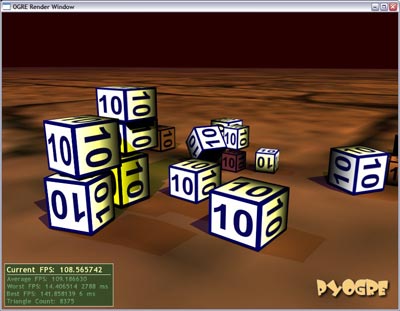
Attached to this post you’ll find a zip file, containing a small example application which allows you to spawn PyODE physics-enabled cubes with the middle mouse button into a PyOgre world. You can then bounce and roll the cubes around by holding the left or right mouse buttons.

The code is fairly straight-forward, and I’ve included quite a number of comments. Should be easy enough to follow what’s going on if you’ve been through the PyOgre tutorials.

A note of performance and stability - you can safely spawn loads of cubes as long as there are not too many collisions going on at once (after around 50 cubes, things start to get really sluggish if there are too many inter-cube collisions going on). In practice though, I doubt you’d need that many collisions happening at any one time. Also, If you make a large pile of cubes, lift them all up, and let them fall down together, it seems to bomb out as there are too many collisions happening when they all land on top of eachother at once. I haven’t debugged this very much, so I’m not sure yet if it’s a ODE limitation, or something bad I’m doing in the code. If anyone works it out, I’d be interested to know.

Please don’t ask for advice on stuff like per-polygon collisions, terrain collision and the like, I have not really messed with this beyond the state of this example. Once you get the basics going after checking out the example, I’m sure a few questions shot off at the PyOgre Forums would turn up more useful results than asking me :).

Have fun ;).

As we all know, PNG images are so much cooler than BMP images. Especially with alpha channels.

A while ago, I found this rather spiffy PNG library for Delphi, which allows you to load PNG files into a TPicture or similar, complete with alpha channels. Generally, it works simplest with TImage, however being a TGraphic subclass, you can do all sorts of drawing and everything else on it.

ANYWAY, I wanted to be able to use these things on buttons (standard TSpeedButton and TBitBtn), however their Glyph property is a TBitmap, preventing us from doing a simple Button.Glyph.LoadFromfile and loading a PNG file. The other option is to load up the PNG on it’s own with a TPNGObject, and assign it to the glyph property, however the alpha gets buggered.

So I came up with a crackful work-around (as I’m finding 90% of all Delphi coding is):

procedure pngGlyph(Btn: TControl; Img: String);
var
    PNG: TPNGObject;
    BMP: TBitmap;
begin
    PNG := TPNGObject.Create;
    BMP := TBitmap.Create;

    try
        PNG.LoadFromFile('path\to\glyphs\'+Img+'.PNG');   // Update the path to your .png files, or update this to get them somewhere else.

        BMP.Width := PNG.Width;
        BMP.Height := PNG.Height;
        BMP.Canvas.Brush.Style := bsSolid;
        BMP.Canvas.Brush.Color := clBtnFace;
        BMP.Canvas.FillRect(Rect(0, 0, PNG.Width, PNG.Height));
        BMP.Canvas.Draw(0, 0, PNG);
        BMP.Canvas.Pixels[0, BMP.Height-1] := clBtnFace;

        if (Btn is TSpeedButton) then
            (Btn as TSpeedButton).Glyph.Assign(BMP);
        if (Btn is TBitBtn) then
            (Btn as TBitBtn).Glyph.Assign(BMP);
    finally
        PNG.Free;
        BMP.Free;
    end;
end;

To use it, you call it like pngGlyph(SpeedOrBitButton, 'glyphname');, and the procedure will hack your button’s glyph into something that looks nice. You can use fully alpha-enabled PNG files, and they should look right.

Of coarse it would be better to create a new button type with this procedure inside that, so you don’t have to call this for every button you want to add a PNG to, but I don’t really feel like re-adding a million buttons, it’s quicker for me to do a million procedure calls :).

Heh :D

So I’ve started work on my own small RSS aggregator for some or other web project I may or may not actually complete. And no, it’s nothing like Gregarius, it’s more of an ‘internal function’ of a larger project.

So anyway, after checking out the various RSS version specs and things, I hunted down as many feeds as I could to get an idea of the kinds of data I’m going to end up sifting through.

Wow. Despite the fact that there are standards out there doesn’t seem to mean much. Nearly every feed is a world apart from the next one, either throwing in millions of useless custom tags, renaming standard tags to some other random thing that made sense to the author and nobody else, leaving out loads of actual useful information, mixing and matching the specs as they feel the urge, and a million other randomnesses.

Anyway, on the way to making sense of it all, I fed some of them through MagpieRSS, which actually does a fairly reasonable job of making them a bit more sane. Still, I have to guess a lot of fields and things, and pretty much hope for the best.

At the moment, people’s RSS feeds generally seems more psychotic than some of their use of HTML.

Well, in the interests of Monster Hunt surviving a bit longer, I’m releasing the full UnrealScript source code.

Included is a basic license document, outlining in simple terms what you may and may not do. Basically, you may make any kind of MH mod or ‘sub-mod’, however you must give due credit for the original creation. Even if it’s very basic, please read it if you intend using it for creating a mod.

You’ll find the file at the end of this post… Have fun :)

MonsterHuntSource.zip

I was browsing around the BeyondUnreal Forums the other day, and came across an 11 page thread, with around 720 replies, about Monster Hunt. Interested to see what’s up, I checked the CSports rankings for Unreal Tournament, and was shocked to find MH is the #4 most played UT gametype in the world. Coming in after CTF, DM, and TDM.

Seems people have been making maps like nuts, there seem to be over 300 of them, there are a few mutators and mods available for it as well. I found there’s even a pretty large fansite, Planet Monster Hunt.

Not too bad for a mod I thought I had retired nearly four years ago ;).

My idea for implementing non-physics physics into my little game framework didn’t work out too well, so I gave in and took a look around for options.

It seems only ODE is available to Python, via PyODE. Not many [open source] physics engines seem to have Python bindings, which I find rather odd.

As it turns out, it isn’t actually all that of a mission to get ODE and Ogre working together, and the results I’ve got so far are quite acceptable. I can spawn loads of cubes (of varying sizes) and throw them around the scene and they bounce and jump around in a suitable fasion.

PyODE and PyOgre playing nicely

I haven’t tried with balls or polygon-accurate stuff yet, that’s next on the to-do list. I also intend writing a short how-to for PyODE and PyOgre integration at some point, as I was a little confused to start with, not knowing quite where or how to begin, and there is no PyODE/PyOgre example code floating around to reference.

EDIT: Example using PyODE and PyOgre now available

It seems as though the guys at work are seriously looking into the option of doing some game development next year some time, and they’ve been busy checking out various engines and frameworks to help with this. Despite being the only person at work who plays games seriously, and my history of developments on the Unreal engine, I haven’t really been included much with what’s going on.

However, since game development (of any kind) is the number one thing I’d like to be doing with my life (NOT point of sale systems!!), I’ve decided to involve myself anyway :D.

I have been playing around with a couple of game and physics engines (games being discussed are potentially vehicle-based), and Irrlicht particularly seems rather nice. Korpse however, suggested I take a look at Ogre. I was very pleasently surprised to find the PyOgre project, which exposes about everything Ogre can do, to Python (you don’t even need the Ogre SDK, it works completely on it’s own), and seems very well supported. I’m a lot more comfortable with Python than I am with C++ :).

The only down side, is that Ogre is not a complete game engine, but rather simply a graphics engine. Meaning, I’ll have to work out how to add sound, physics, advanced input options (Ogre does support keyboards at least), etc on my own. There are a lot of options available for all of those, so I’m not really worried about it at the moment.

I’ve begin putting together a bit of a basic framework for myself, trying to base how things work around how UnrealScript works and interacts with classes and objects. It’s working out pretty cool, thanks again to Python.

As a test project, I’ve decided to put together a sort of basic World War II flight sim. All you need really is a model, some terrain, and basic flight physics (which I plan on simulating without the use of a physics engine, in a similar fasion to how I did some stuff in Unreal Tournament [pre-Karma]).

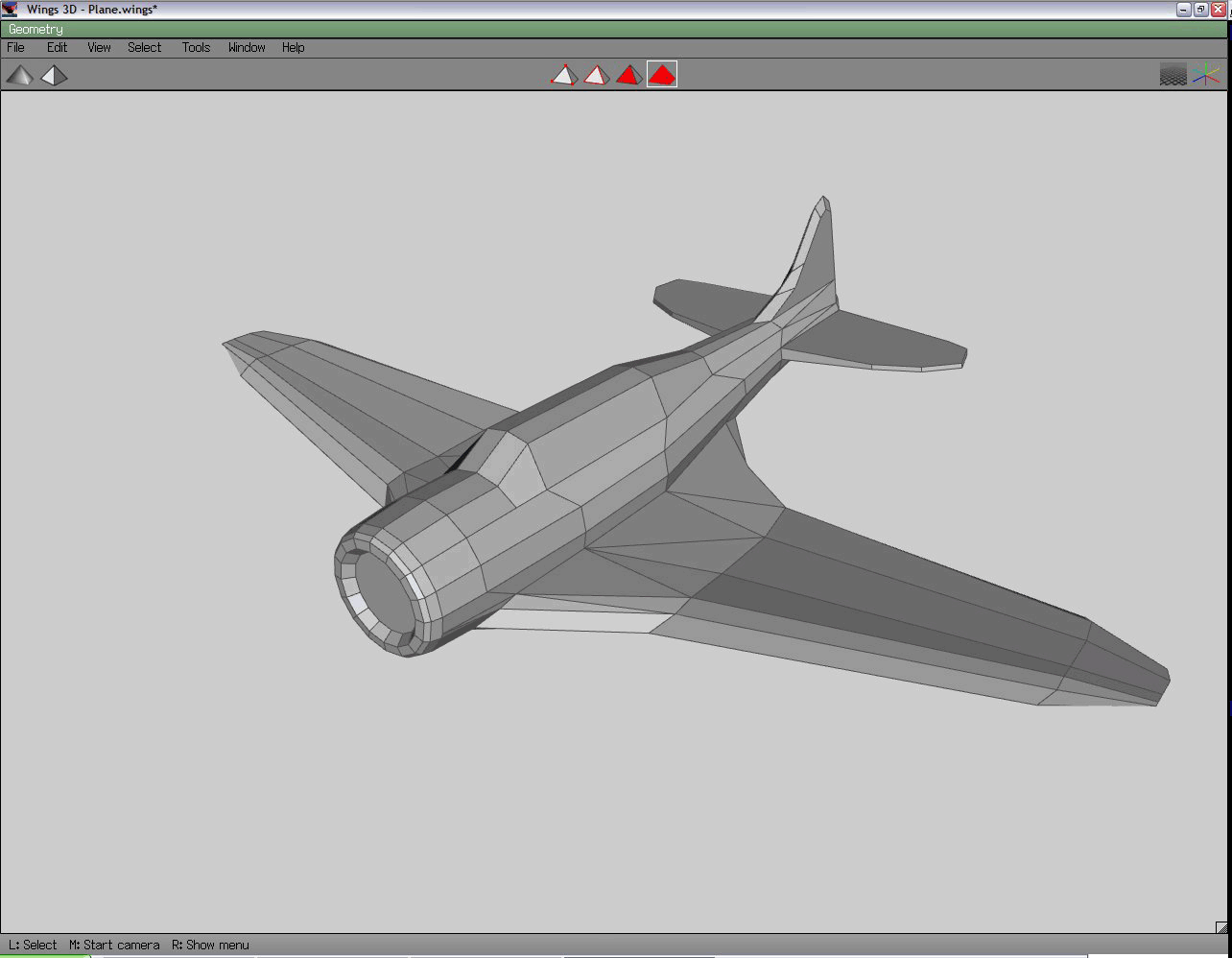
Since the scripting is going well, I decided to take a shot at a quick model. I came across Wings 3D – a simple “subdivision modeler”. Basically you start off with whatever primitive shape (cube, spheres, cylinder, etc) you think will suit what you’re going to build, and stretch and warp it into the final product. I’ve never modeled like this before, but it works surprisingly well.

After 2 hours work, I got the following result from a 16-sided cylinder:

There are quite a number of rather ugly polygons, but it was a learning experience :).

Update: DynaBar 2 is available, the download link below is out of date.

Finally got around to making a proper release of something :).

Presenting DynaBar, a PHP script which can create dynamic images through the use of plugins, inspired by the Userbars.com website.

I thought it would be cool to be able to have userbars with dynamic data in them, stuff like game server status, stats, etc., etc. to make them a little more exciting. I also wanted to learn a bit more about PHP’s image manipulation, so this proved a good oppertunity for that.

Basically, the whole thing works off a plugin system, which lets you drop in a PHP script (the plugin), set up a config file (the userbar), and link to an image. DynaBar then goes about loading the plugin, requesting it’s data (so it goes off and collects stats, or whatever), and building the final image (putting on the [optional] scanline effect, glossy shine, and layering the text data from the plugin on all of that).

I’ve also created a small designer script, which allows you or any users to create new userbars using plugins or whatever, with their own images and content, in a simple wizard-like interface. The end result is ready-to-use forum or HTML code. :).

Here are some examples, using plugins included in the package:

Image lost in time Simple, plain text (nothing dynamic about it).

Image lost in time This one queries LastFM for which song I’ve played most recently in my media player.

Image lost in time Finally, here we have Battlefield 2 stats, coming from BF2Tracker’s clan XML feed.

Grab the download from the bottom of this post. Please read the README in the doc/ directory.